


Golf Cart Controller Troubleshooting: Common Problems and How to Fix Them

When your golf cart suddenly loses power, struggles up hills, or just won’t move, don’t panic. Often, the problem traces back to a faulty or misbehaving speed controller. In this guide, we’ll walk you through practical steps to troubleshoot and fix common controller issues. The good thing? No mechanic is required.
What Does the Golf Cart Speed Controller Actually Do?
Think of your golf cart’s speed controller as the electronic brain that controls how much power flows from the batteries to the motor. It determines how fast you accelerate, how much torque you have going uphill, and how smoothly your cart performs.
When it’s working, the controller ensures a seamless driving experience. But when your golf cart controller is not working, expect symptoms like jerky starts, power loss, or complete stalling especially if it’s been exposed to heat, moisture, or installed in a tricky golf cart controller location that makes airflow difficult.
What a Golf Cart Speed Controller Does
- Manages power flow from the battery to the motor
- Controls the cart’s speed, torque, and acceleration
- Directly impacts throttle response and ride smoothness
- If the controller fails, your cart may not move at all
Signs Your Golf Cart Controller Is Failing
- Erratic Speed Behavior: Sudden surging, inconsistent acceleration, or inability to reach top speed
- Power Loss: Sluggish performance or poor uphill response
- Strange Noises or Smells: Buzzing, clicking, grinding, or burning odor near electrical components
- Error Codes: Some carts display diagnostic codes related to controller failure
If any of these symptoms sound familiar, you’re in the right place.
Common Problems and How to Fix Them
|
Problem |
Possible Cause |
Fix |
|
Cart doesn’t move |
Loose wiring, dead controller |
Inspect wiring, test voltage, replace if needed |
|
Jerky acceleration |
Dirty throttle signals or poor connections |
Clean connectors, inspect throttle sensor |
|
Clicking but no movement |
Controller not powering motor |
Check output voltage, consider controller replacement |
|
Controller overheating |
Short circuit or poor airflow |
Replace or improve ventilation |
|
Error codes flashing |
Fault mode triggered |
Check code chart, follow recommended fix |
When to Repair vs. Replace Your Controller
Some issues, like dirty connectors or loose wires, can be fixed with basic maintenance. But when your speed controller not working becomes a regular issue, or if internal components are damaged, it’s often best to replace it.
Replacement Costs
- OEM Controllers: $250–$800+
- Aftermarket Performance Controllers: $650–$1000+
- Labor (if not DIY): $100–$300+
If you’re upgrading to lithium batteries or a high-torque motor, upgrading your controller at the same time is a smart move.
Thinking bigger than a controller upgrade? If you’re weighing a DC controller upgrade vs a full AC conversion, this guide breaks down cost, performance gains, and who it’s actually worth it for: Is a Golf Cart AC Conversion Worth It?
Safety Tips for Controller Maintenance
- Always disconnect your battery pack before touching wiring
- Use insulated tools and wear protective gloves
- Avoid static discharge: ground yourself before handling electronics
- Look for burnt smells, melted wires, or damaged terminals
“Never test live wires without proper safety equipment! Controllers operate at high voltage.”
Troubleshooting Saves Time and Money
Most golf cart controller troubleshooting steps can be done at home with a voltmeter, a clean workspace, and some basic knowledge. Whether your golf cart controller is not working or just acting erratically, diagnosing the issue early can save you from costly repairs and downtime.
Looking for a Replacement Controller?
Explore our curated selection of OEM and performance speed controllers compatible with Club Car, EZGO, and Yamaha. Need help choosing the right fit? Our support team is here to guide you.
FAQs about Golf Cart Controller Troubleshooting
Related Products

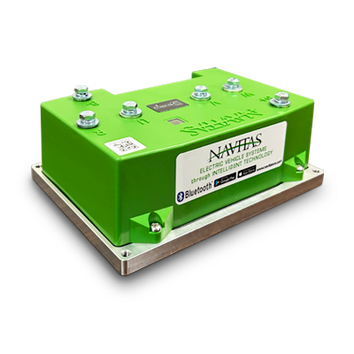
Vendor: EZGO RXV Navitas Controller Kit - 600 amp or 440 amp

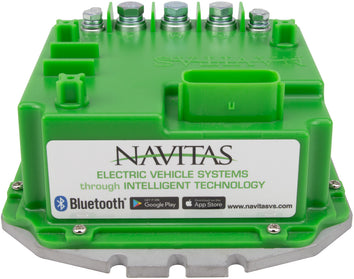
Vendor: Club Car Precedent / Onward / Tempo / IQ Navitas Controller Kit - 600 amp or 440 amp
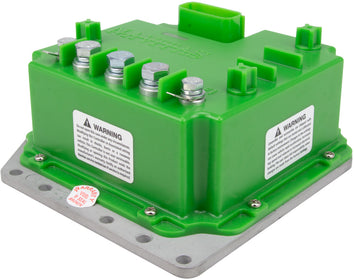
Vendor: Yamaha Navitas Controller Kit - 600 amp or 440 amp - Drive2 / Drive / G19 / G22


Vendor: Navitas Controller On-the-Fly Programmer All Models


